ERP E-Commerce Migration: Secure Switch from PlentyONE to Odoo
The most common concern before an ERP migration is that the shop will be carried away. This is unfounded. We only replace the ERP in the background; your Shopware 6 frontend remains technically untouched.
What triggers the change is usually one of three things: a cost curve that rises faster than sales, functional limits that can only be circumvented by workarounds, or an architecture that can no longer support the next level of growth.
HQ GmbH carries out PlentyONE-to-Odoo migrations as a planned architectural project: system analysis, data mapping, test migration, controlled go-live. The methodology behind this is documented in our technical migration manual.
This page describes the complete migration service. If you initially only need a more robust ongoing interface between an existing Odoo system and your Shopware frontend, without a complete ERP replacement being imminent, the Odoo & Shopware Integration or the Shopware Odoo Connector is the more suitable service.
Request a free migration audit
When it makes sense to switch from PlentyONE to Odoo
An ERP change is rarely worthwhile for a single reason. Typical triggers are economic in nature – for example, a noticeably increasing cost base with revenue-dependent tariff models – technical in nature – for example, growing B2B, warehouse, or financial requirements that are increasingly solved via workarounds in the existing system – or strategic in nature, when data sovereignty and expandability become more important for the next growth phase.
The detailed economic analysis, including TCO and ROI logic, can be found in PlentyONE Price Increase, and the functional and architectural evaluation in PlentyONE Alternative Odoo.
For you, this means that a serious recommendation does not begin with "Odoo is better", but with an honest analysis of whether your specific requirements have actually reached the limits of your current system.
Keep Shopware 6 and replace the ERP
No, an ERP migration does not require a Shopware relaunch. In the target architecture we implemented, Shopware 6 remains fully intact as the frontend and presentation layer: storefront, checkout, search, SEO structure, and theme remain untouched. Odoo 19 takes over all ERP processes in the background as the new leading instance for master data, inventory, purchasing, and accounting.
This separation significantly reduces your project risk: Instead of a complete replatforming, the migration exclusively affects the backend and the integration layer in between. The complete architectural justification can be found in "Keep Shopware when changing ERP".
Our migration process.
We work according to a fixed, phase-based project model, which is derived directly from our technical migration manual:
System Analysis
Inventory of your current PlentyONE, Shopware, and third-party system landscape, including measurement of your actually available API budget.
Target architecture
Defining system responsibilities: which system will be the leading source for which data in the future, and how Shopware and Odoo will be technically connected.
Data Sources / API Budget
Clarification of which data is extracted directly from PlentyONE and which is extracted from the existing shop system in order to conserve PlentyONE's limited API quota.
ETL / Transformation
Structured extraction, normalization, and merging of data from all source systems before the actual import.
Mapping
Semantic assignment via stable business keys (SKU, Shopware UUID) instead of technical surrogate keys – the basis for referential integrity in the new system.
Connector
Development of the asynchronous, event-based integration layer between Shopware and Odoo for ongoing operations after go-live.
Test Migration / Dry Run
Complete test runs against a staging environment, including automated validation of duplicates, relations, and pricing logic.
Data Validation
Systematically check for data quality problems before the productive import – not just afterwards.
Cut-over / Go-Live
Short, controlled ERP switchover after final delta reconciliation, followed by validation and monitoring. The shop remains accessible.
Hypercare
Close support in the first few weeks after go-live to quickly clarify any questions or edge cases that arise.
These ten phases do not run strictly sequentially in individual steps, but partly in parallel: While the system analysis is still clarifying the last details of the target architecture, the extraction strategy for PlentyONE can already be prepared. This parallelization shortens the overall project duration without compromising the diligence of individual phases.
PlentyONE Odoo covers data migration and data mapping in detail during ERP migration, including scope definition and data mapping.
Data migration without loss of business data.
Products, customers, prices, inventories, and historical orders are migrated in a fixed, consistency-ensuring sequence: categories and manufacturers first, then products and variants, followed by customers, orders, and associated documents. We transfer historical prices and tax rates unchanged, without automatic recalculation – this ensures that past invoice amounts remain precisely traceable, which is particularly relevant for tax advisors and auditors during subsequent tax audits.
For you, this means that your established customer history, your return processes, and your audit capability will be fully retained after the migration – not just the currently active master data.
Protect SEO and Shopware
As long as Shopware 6 remains the sole public frontend, practically nothing changes for Google and other search engines: URLs, metadata, canonical tags, and structured data will continue to be managed exclusively by Shopware. One point deserves special attention: as soon as Odoo takes over the management of product descriptions, derived SEO URLs can change – we therefore treat this preservation as an independent, actively checked migration task instead of an automatic process. The complete methodology is shown in SEO Migration Shopware 6.
Controlled Go-Live
The actual cutover process is reduced to a short, precisely planned period: final delta reconciliation, automated validation, switching of the leading system, and subsequent monitoring – secured by a pre-documented rollback plan. This affects the ERP level, not your shop. The cutover logic explains ERP migration without downtime.
Security and quality mechanisms
Instead of blanket "guarantees" – which could not be reliably assured either legally or factually – we rely on concrete, verifiable mechanisms for protection:
- Data integrity: Mapping exclusively via stable business keys, systematic validation of duplicates and relations before each import.
- Backups: complete backup before each production step
- Retry logic: Exponential backoff strategies for all external API calls
- Monitoring: continuous monitoring of technical and business key figures from the first day after go-live
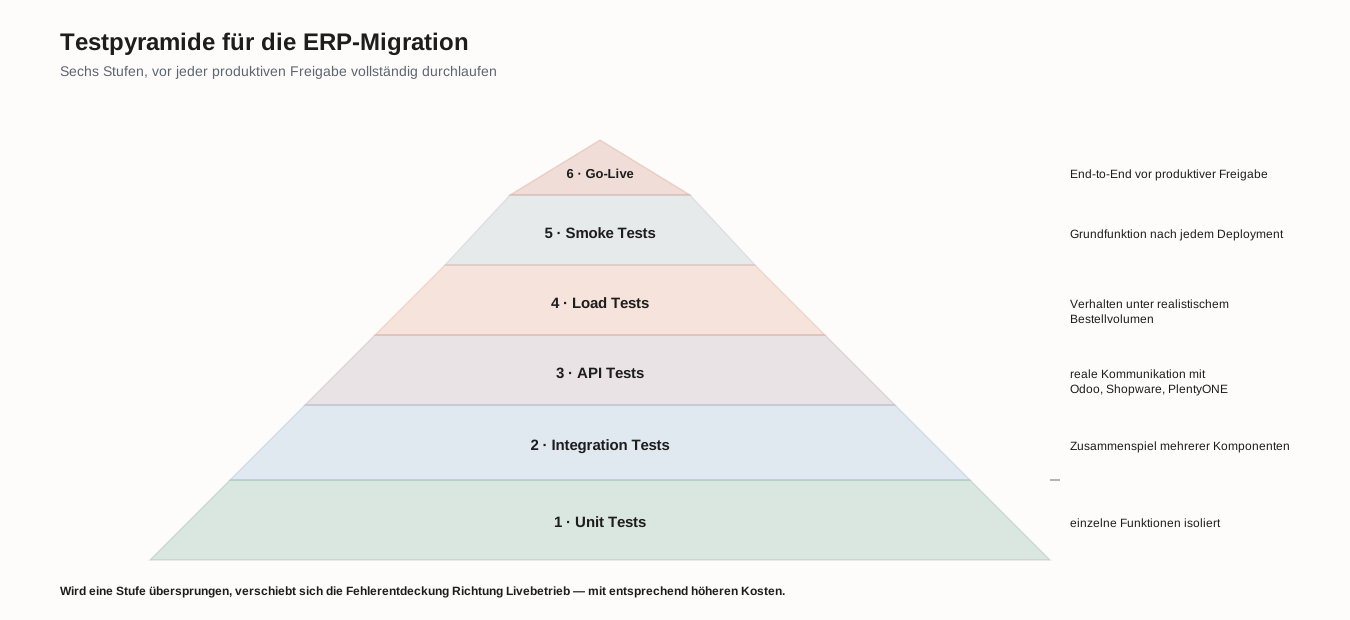
- Test pyramid: Unit, integration, API, load, smoke, and go-live tests before each production release.
- SEO preservation: dedicated reconciliation of your SEO URLs before the cutover
These mechanisms do not work in isolation, but rather interlock: The test pyramid is intended to identify relevant integrity errors before go-live if possible, monitoring is intended to make errors visible during operation, and the backup and rollback concept provides additional protection for unexpected problems after the switchover. No single mechanism therefore has to be perfect – the combination of several complementary safeguards carries the project risk.
We describe the most common avoidable errors in this process – and how we systematically exclude them – in PlentyONE Odoo Migration Errors.
For whom migration makes sense
A complete PlentyONE to Odoo migration is typically worthwhile for companies with:
- E-commerce structures with several hundred thousand items
- well-established B2B processes (individual price lists, approval processes, credit limits)
- multiple warehouses or complex multi-warehouse management
- individual pricing logic and volume discounts
- complex existing integrations with third-party systems
For smaller, less complex system landscapes, remaining with PlentyONE may still be the more economically sensible choice – the technical analysis will clarify this in advance with an open mind.
Frequently asked questions about the PlentyONE-Odoo migration
How long does a complete migration typically take?
This depends largely on the data volume, the complexity of the data mapping and – in the case of a high PlentyONE share – the available API budget for the extraction. A reliable time estimate can only be provided by the technical analysis of your specific systems.
Will we lose access to our shop during the migration?
No. The actual full import takes place weeks before the switchover, while PlentyONE continues to run as the master system throughout. The productive switchover itself takes a few minutes and affects only the ERP – the shop remains accessible.
What happens to our existing custom developments in the Shopware frontend?
These generally remain unaffected, provided they do not contain their own ERP business logic (e.g., their own price calculation). If they do contain ERP logic, this will be moved to Odoo as part of the migration to avoid duplicate master data maintenance.
Can we still make adjustments to the integration layer after the migration?
Yes. The architecture is modular – individual synchronization areas (inventories, prices, orders) can be expanded or adapted independently of each other without having to rebuild the entire integration.
The overall technical overview of the target architecture, data migration, integration, and go-live can be found under Migrating from PlentyONE to Odoo.
Why HQ GmbH?
Our technical migration guide documents the architecture, data mapping, ETL processes, API strategy, connector setup, and go-live procedure in detail and is updated as living documentation for relevant interface changes. The underlying reference implementations have been practically verified against a self-hosted Odoo 19 instance, a production PlentyONE instance, and a Shopware 6.7 instance – over 500 reference scripts are publicly available at github.com/HQ-GmbH/plenty-erp2odoo. The production migration tool developed from this deliberately remains proprietary and part of our project services.
Mathias Goldhan, Managing Director of HQ GmbH, has practical experience with Odoo since its early TinyERP era, as well as over three decades of e-commerce strategy consulting for medium-sized companies and corporations.
Common objections – and how we deal with them
Migration is too expensive for us, and the outcome is uncertain.
That’s why we don’t start with a fixed-price offer, but with a free technical analysis. Only when the scope and effort are clear do we talk about costs.
We don’t have our own IT department that can manage such a project.
For this exact purpose, we have a dedicated technical contact person on our side who coordinates project planning, data migration, and cut-over.
An ERP change inevitably means downtime and loss of revenue.
The full import takes place weeks before the actual cutover; the productive switchover itself is reduced to a few minutes at the ERP level, while your shop remains accessible.
We are concerned about losing our Shopware frontend and our rankings.
This is precisely what the described architecture prevents: Shopware remains technically untouched, and the project risk remains limited to the ERP and integration layer.
Goal of the migration with HQ GmbH
✅ Odoo 19 as the new, leading ERP system without the need for a frontend relaunch
✅ Maintaining the existing Shopware 6 structure as the goal of the audited SEO and migration measures
✅ Complete transfer of the data defined in the agreed migration scope, including relevant historical data.
✅ Controlled go-live with a documented rollback plan
Plan your ERP migration in detail
Before a migration begins, an honest technical analysis of your system landscape is required: effort, risks, and the appropriate target architecture. This is exactly what our free, non-binding e-commerce audit provides – as a first, risk-free basis for decision-making.
Find out if and how switching from PlentyONE to Odoo will specifically benefit you.
Alternatively: Speak directly with a technical contact person now for an initial assessment of whether a complete migration or a gradual integration is the right next step for you: +49 36626 31760
✔ Free ✔ Non-binding ✔ Technical contact person ✔ Response within 24 hours