Odoo & Shopware Integration: Asynchronous Interfaces for High-Performance E-Commerce
An interface that transfers data is quickly built. One that also holds up on the day of action when a thousand orders come in at the same time and the ERP is responding slowly is an architectural question.
HQ GmbH builds this integration layer asynchronously and event-based: Shopware remains your frontend, Odoo takes over the ERP. Asynchronous message queuing – either Shopware-native or via RabbitMQ – decouples both systems instead of synchronously chaining them together. Processing takes place within the plugin itself, without additional external middleware.
Whether you are already working productively with Odoo and only need a more robust interface to Shopware, or whether the integration is part of a larger ERP change – this page describes the ongoing, technical integration service itself. If you are still facing the complete migration from PlentyONE to Odoo, you will find the appropriate service under ERP E-Commerce Migration.
Request a free integration audit.
End API limits and inconsistent inventories
Many companies come to us with a specific initial situation: an existing all-in-one system like PlentyONE is reaching its API limits, or an Odoo-Shopware migration that has already begun is producing inconsistent inventory, duplicate orders, or unreliable pricing data. The cause is rarely the data volume itself, but rather the architecture of the interface.
Odoo is not inherently limit-free either: like any system with API access, an Odoo instance should be realistically sized in terms of hosting, worker configuration, and database performance. The crucial difference to a poorly designed integration lies not in the absence of limits, but in how an architecture deals with them.
For you, this means that inventories, prices, and orders remain consistent even during peak loads because the architecture does not rely on synchronous real-time queries, but rather on robust, asynchronous processing.
Architectural Fundamentals
Event-driven instead of polling
Instead of repeatedly asking the ERP if anything has changed, a change in status – a new price, a changed inventory – triggers an event that is passed directly to the relevant systems.
Queue-based instead of directly coupled
Events first land in a message queue, not directly at the target system. This completely decouples sender and receiver from each other: If Odoo is temporarily unavailable, the queue collects the messages instead of losing them.
Asynchronous processing
The checkout writes a new order to the queue in milliseconds and completes successfully immediately – regardless of how long the actual processing in the ERP takes.
Error and Retry Processing
If a transmission fails, the message remains in the queue and is automatically reprocessed using exponential backoff. Unprocessable messages are controllably routed to a dead-letter queue instead of being lost unnoticed.
This means that your checkout will remain available even if the ERP system is undergoing maintenance or is under an unusually high load.
Service modules
Depending on the initial situation and objectives, we integrate the following areas between Odoo and Shopware:
- Inventories: event-based feedback of inventory changes to the front end
- Pricing: including customized B2B prices and volume discounts via structured price lists
- Orders: Asynchronous transfer from checkout to ERP with full retry protection.
- B2B order routing: Forwarding of complex order processes (approvals, credit limits, individual conditions) between the front end and ERP
The actual scope of a project always depends on your specific business processes – we integrate what you actually need, not what would be technically possible across the board.
When integrating inventory, the response time is particularly crucial: a change in the ERP should be visible in the frontend within a timeframe that makes sense for your business in order to avoid overselling when inventory is low – without slowing down the checkout process itself.
When integrating prices, we structurally consider existing B2B special conditions from the outset instead of treating them as a special case afterwards – individual price lists in Odoo are independent, reusable objects that can also be applied to new customers with comparable conditions.
B2B order routing is particularly relevant for retailers with complex approval processes: an order that requires internal approval must be reliably communicated back and forth between the front end and the ERP without the customer losing track of the actual order status during this process.
Our technical integration architecture.
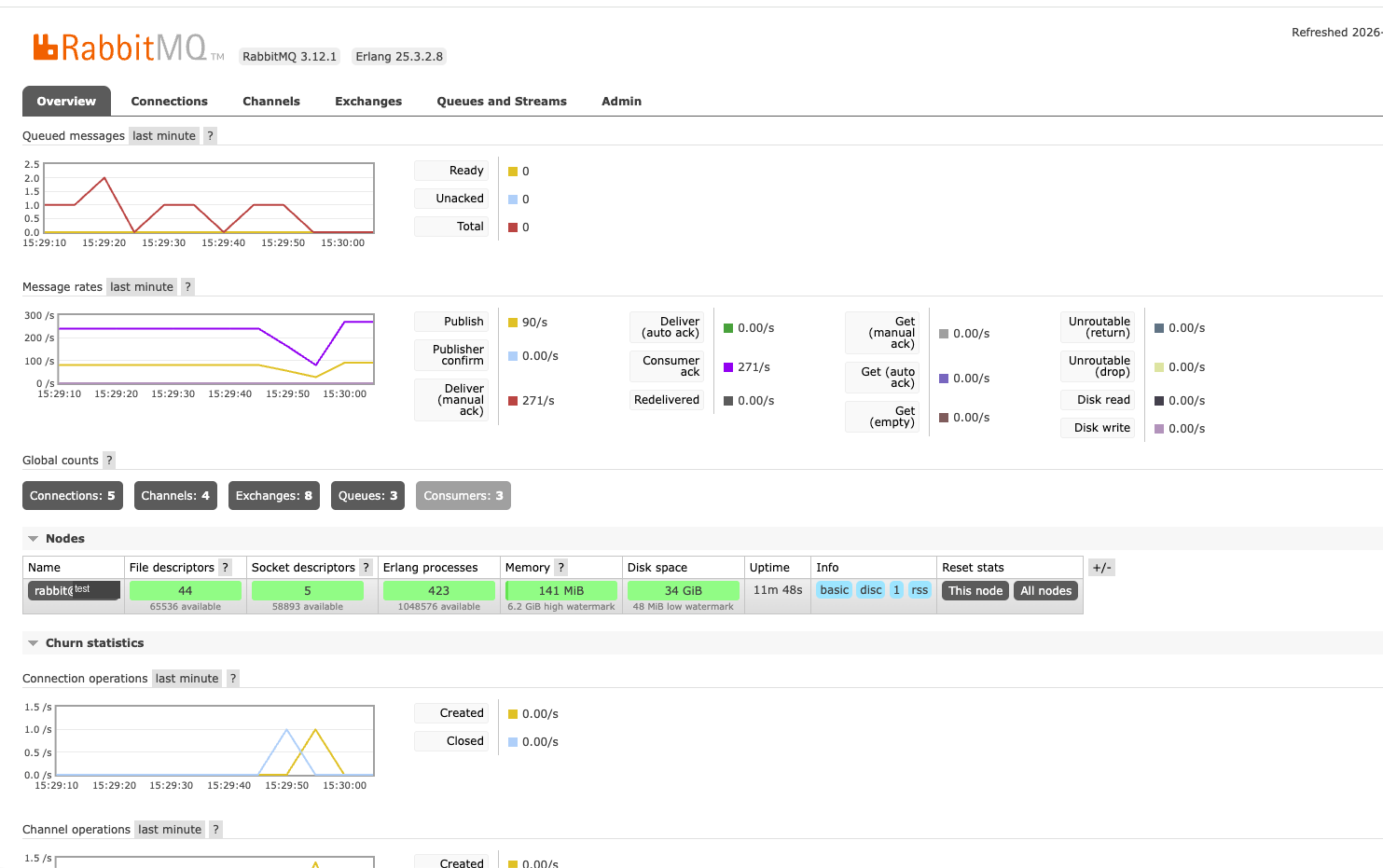
Our reference architecture relies on a RabbitMQ Message Queue between Shopware and Odoo, connected via established patterns such as Publisher Confirm, retry loops, and Dead Letter Exchange. Communication with Odoo is exclusively via the current JSON-2 API with Bearer Token authentication; mass operations run via the performant, idempotent load() method.
Monitoring is not a downstream step, but part of the architecture from the very beginning: an observability setup monitors technical metrics such as database load and queue fill level, as well as business key figures such as orders per hour – with automatic alerts for anomalies. We explain the full technical depth of this architecture – including idempotency mechanisms and error handling – in Odoo Shopware 6 Connector and Odoo 19 JSON-2 API.
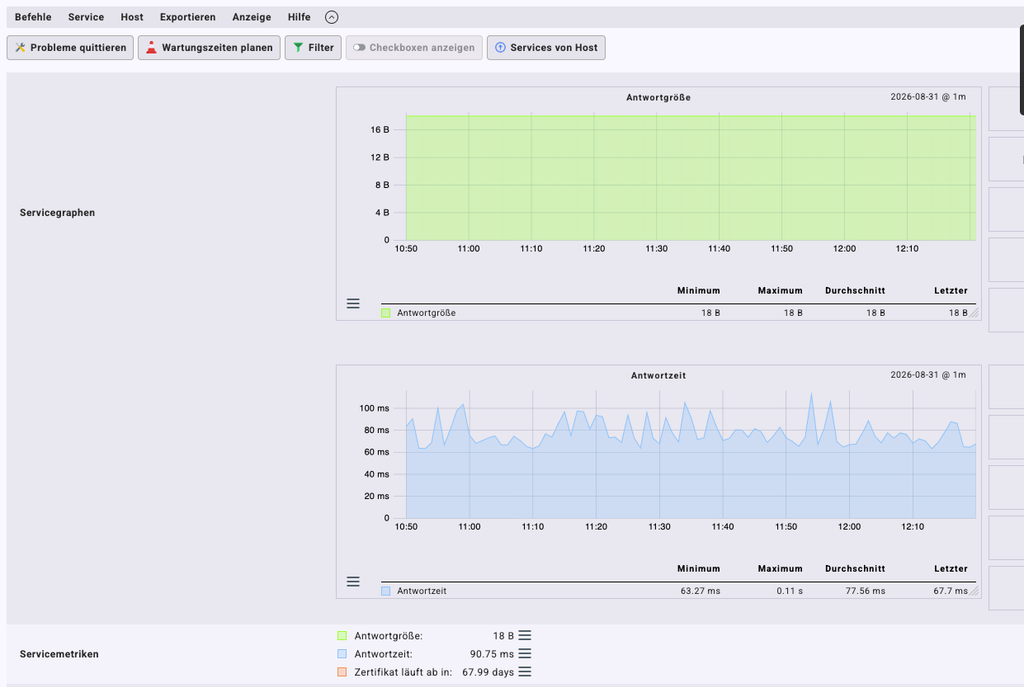
Real API monitoring (check_mk, test instance): Response time monitoring of the Odoo API interface.
How we analyze an integration project
Every integration project begins with a technical inventory, not with a prefabricated offer:
- As-is architecture: Which systems are currently connected to each other and in what way, and what dependencies already exist?
- Interfaces: Which APIs, limits, and authentication methods are relevant on both sides?
- Data flows: Which entities need to be synchronized in which direction and with what level of up-to-dateness?
- Load profiles: What do actual order volumes and peak loads look like – for example, on promotion days?
- Risks: Where are there currently synchronous dependencies or missing error handling?
The result is a concrete integration architecture tailored to your system landscape – not a generic blueprint. A look at the individual analysis steps in detail:
When recording the current architecture, we not only document which systems exist, but also how closely they are already coupled today – an existing but unstable synchronous interface requires a different migration strategy than the complete reconstruction of an integration from scratch.
The interface analysis specifically checks whether your chosen Odoo edition and hosting model provide the required API in full – a prerequisite that must be clarified before any architectural decision is made.
The data flow analysis determines which entity (inventories, prices, orders) must be synchronized with which update requirement – not every data class requires real-time synchronization; some can tolerate a planned, periodic update.
Load profile analysis is particularly relevant for retailers with pronounced promotion days: an architecture that runs stably in normal operation can reach its limits under ten times the usual order volume on a Black Friday weekend if it was not designed for it.
Why HQ GmbH?
HQ GmbH combines over 30 years of experience in hosting and developing custom software with deep, documented expertise in the Odoo-Shopware ecosystem. Our technical migration guide describes the underlying architecture in detail and is updated as living documentation when changes are made to the relevant APIs. The associated reference implementations have been practically verified against a self-hosted Odoo 19 instance, a production PlentyONE instance, and a Shopware 6.7 instance – over 500 reference scripts are publicly available at github.com/HQ-GmbH/plenty-erp2odoo.
Our Shopware Certified Solutions Architects and Senior Integration Architects develop your interface entirely in-house – without external subcontractors, with a dedicated technical contact person throughout the entire project.
If you are not only facing the ongoing integration but also the complete change of the ERP system, you can find the overall technical overview under Migrating from PlentyONE to Odoo.
Common objections – and how we deal with them
We do not have our own IT department that can handle such an integration.
A dedicated technical contact person on our side is available to coordinate architecture, implementation, and monitoring. No additional expertise needs to be built up internally for this.
Our current interface basically works, but it is unstable.
This is one of the most common starting points – and usually an architectural problem, not an implementation error. Where an interface synchronously waits for the ERP, it directly transfers its response time to the checkout. This coupling can be specifically resolved by our Shopware to Odoo interface without having to set up the system again.
We fear high costs for individual integration.
That’s why we start with a free technical analysis, not a fixed-price quote. We only discuss costs once the actual scope is clear.
Frequently asked questions about the Odoo-Shopware integration
How does this service differ from a full ERP migration?
This page covers the ongoing technical integration between an existing or newly introduced Odoo system and your Shopware frontend. If you are still facing the complete change from PlentyONE to Odoo, ERP E-Commerce Migration is the right service – the integration layer is an integral part of the migration project.
How long does it typically take to set up such an integration?
This depends on the number of processes to be integrated (inventories, prices, orders, B2B routing) and the current maturity of your existing interfaces. A reliable time estimate can only be provided by the technical analysis of your specific systems.
Can we continue to manage the integration ourselves after it has been set up?
Yes. We fully document the architecture and hand over a maintainable system. For ongoing development and monitoring, we also offer a support framework if you wish – there is no obligation to do so.
Your result after an integration with HQ GmbH
✅ Asynchronous architecture instead of blocking checkout dependencies
✅ Consistent inventory, prices, and orders, even during peak loads
✅ Complete monitoring with automatic alerts
✅ Shopware remains your commerce platform unchanged
Schedule a technical integration audit now
Before we propose a specific architecture, we examine your existing system landscape: architecture, APIs, data flows, queue connectivity, error handling, and performance. The result is a clear, technically sound basis for decision-making – not a sales pitch.
Find out where your current integration has vulnerabilities – free of charge and without obligation.
Alternatively: Speak directly with a technical contact person now: +49 36626 31760
✔ Free ✔ Non-binding ✔ Technical contact person ✔ Response within 24 hours