Shopware 6 Performance Optimization: Architecture instead of standard infrastructure
Note regarding Shopware 6 performance: The exact source of loading time bottlenecks – whether in the frontend, during API queries, or deep within the database – varies from project to project. This guide serves as an architectural orientation. As a certified Shopware agency, we are happy to assist you with a dedicated bottleneck analysis of your system.

Experiencing acute performance problems in Shopware 6?
Let our certified experts analyze the bottlenecks in your core architecture and server infrastructure.
Introduction to Performance Optimization
For medium-sized businesses, the performance of an online shop determines conversion rates and customer satisfaction. However, efficient optimization begins where standard documentation leaves off: with the elimination of structural code latencies and the precise tuning of the entire infrastructure stack.
Learn how to specifically shorten the server's first critical response layer in our deep dive on optimizing Shopware TTFB.
Key factors for performance
The software and plugin level
A common misconception is that performance problems can be solved simply by adding more server resources. If the underlying software architecture is inefficient, a cache only temporarily masks the problem – until the next cache miss under full load.
Role of hosting in performance
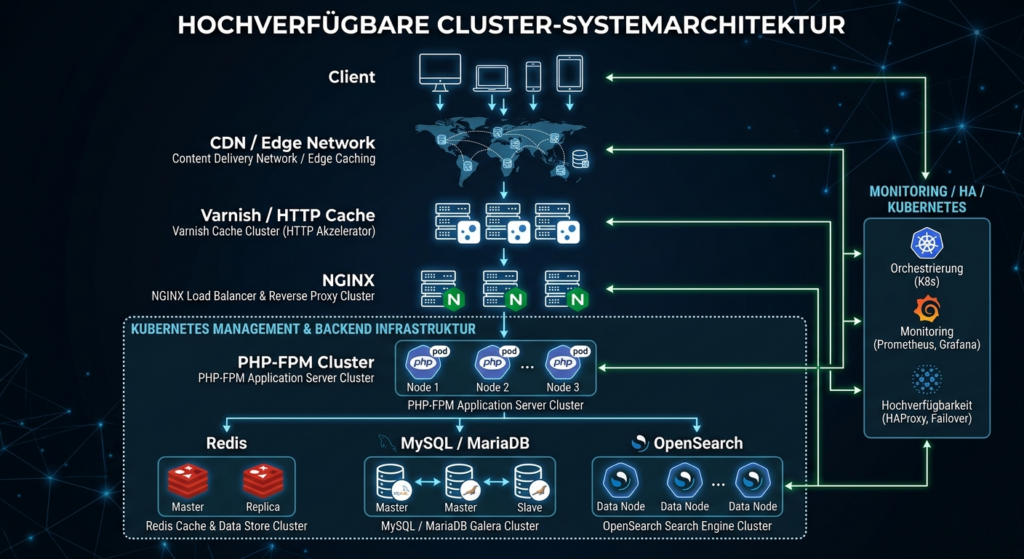
Professional hosting plays a crucial role in the performance of your online store. A suboptimally configured server can lead to massive bottlenecks, even with perfectly written software. As a specialized Shopware agency with over 30 years of experience at the intersection of software architecture and infrastructure, we analyze the entire system to identify the true bottlenecks.
Our technical team, specializing in high-performance hosting, offers customized environments precisely tailored to the workloads of Shopware 6. We take responsibility for the optimal server configuration and ensure your shop receives the necessary resources for fast loading times and uncompromising stability. To see how such a technical overhaul works in practice, read our case study on rescuing a B2C online shop through targeted hosting and code optimization. You'll also find detailed information on optimization options in our accompanying guide to Shopware hosting optimization.
Architectural best practices for high-performance stacks
Frontend code optimization and fine-tuning of Core Web Vitals are ineffective if the underlying server architecture stagnates during sudden spikes in load. A future-proof setup strictly separates the various services to consistently prevent mutual resource bottlenecks.
A deep look into the Symfony profiler reveals why standard configurations fail under real-world conditions:
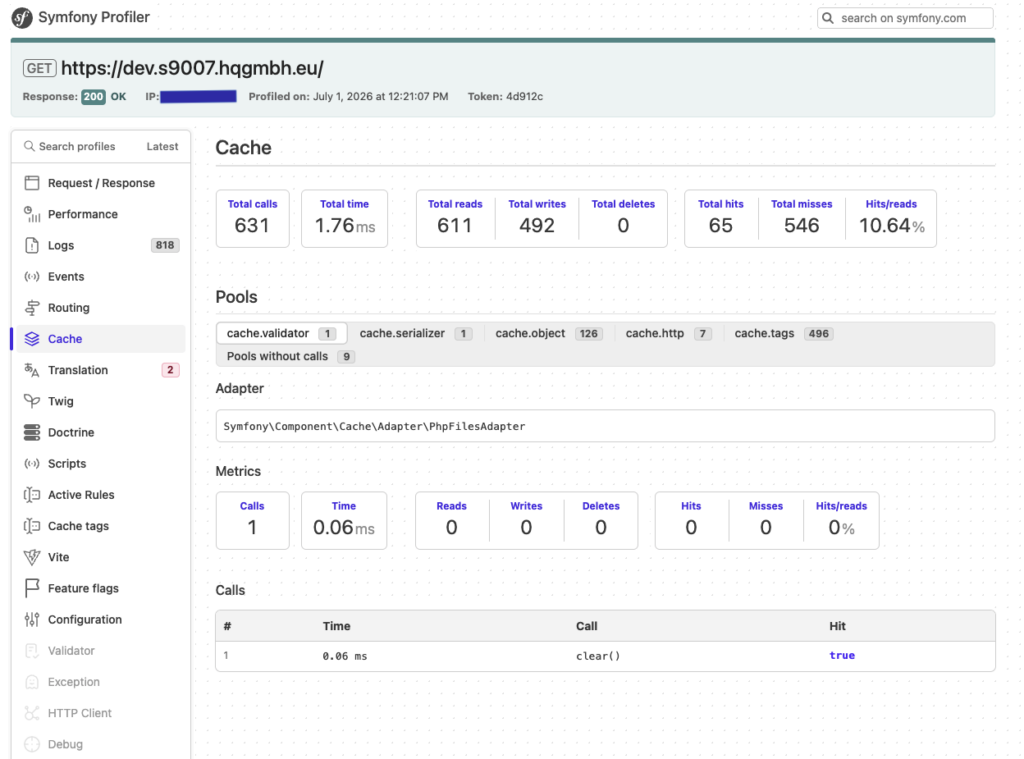
Live analysis of a suboptimal cache setup: This profiler extract starkly reveals the typical bottlenecks. With a cache hit rate (hits/reads) of just 10.64%, the caching effect is almost entirely negated – with 546 cache misses, the server has to regenerate the data, which is computationally intensive. Furthermore, since the file-based default adapter ( PhpFilesAdapter ) is active, the 492 write operations generate massive I/O load on the file system. Under heavy load, this inevitably leads to blocking processes (file locks). Our best practices eliminate precisely these silently running performance hogs.
1. MySQL & Database Optimization (Eliminate N+1 Queries)
Shopware 6 uses the Data Abstraction Layer (DAL) in its core. Poorly written plugins or sloppy theme customizations can quickly lead to so-called N+1 query problems: Instead of querying all the necessary data with a single, efficient JOIN, the system fires a separate database query for each individual product in a list. With 48 products on a category page, this means 48 additional, time-consuming round trips.
While we identify acute query bottlenecks in the development environment directly using the integrated Shopware & Symfony profiler, we use specialized profiling tools like Tideways for continuous monitoring and root cause analysis under real production load in live operation. This allows us to eliminate inefficient loops directly in the code without burdening the live server with debug overhead.
2. Configuration of the PHP stack & OPcache
Outdated PHP versions pose an avoidable security and performance risk. We consistently use current PHP versions (such as PHP 8.4 or 8.5) and optimize the parameters in the php.ini. Precise tuning of the PHP OPcache (including JIT compilation) ensures that the pre-compiled bytecode remains directly in memory, drastically reducing the execution time of Symfony routines.
3. Dual in-memory caching via Redis
Under high load, file-based session and cache handling inevitably leads to I/O bottlenecks and file locks. Our optimized infrastructures utilize two physically separate Redis instances for this purpose: one exclusively for session handling – stored centrally in Redis, allowing the application nodes themselves to remain stateless and scale horizontally as needed; the second serves as an ultra-fast key-value store for the app and Shopware cache.
Continuous performance optimization
Role of cron jobs: CLI worker instead of admin worker
By default, the "Admin Worker" is active in Shopware 6. This performs important system cron jobs (such as cache clearing or indexing) in the background while real visitors browse the shop. During periods of high traffic, this can block HTTP processes and cause server latency to rise uncontrollably.
The performance solution (separation of front-end and back-end): We completely disable the admin worker in the back-end and move the execution of all background processes to a dedicated, server-based CLI worker via
systemdorsupervisor. This strict architectural separation ensures that computationally intensive background tasks run in isolation at the system level. This prevents admin processes or asynchronous tasks from blocking the storefront's PHP-FPM workers – customers in the checkout process retain full server priority at all times.
Monitoring Core Web Vitals
Continuous monitoring of Core Web Vitals – especially Largest Contentful Paint (LCP) and Interaction to Next Paint (INP) – is a crucial component of long-term stability. By strategically using tools like Google PageSpeed Insights, we obtain precise field data to identify and address gradual delays caused by growing product catalogs or ERP interfaces before they negatively impact your rankings and conversion rates.
Technical infrastructure for Shopware 6
Frontend code optimization is pointless if the underlying server architecture stagnates during sudden spikes in load. For e-commerce managers, hosting infrastructure is not a passive IT expense. It directly impacts transactional stability at checkout. Those running complex omnichannel platforms or computationally intensive B2B catalogs on inadequately sized standard environments risk timeouts (HTTP 504 gateway errors) and lost revenue at the moment of order.
Scalability and future-proof protection
While mid-range systems achieve excellent loading times on a dedicated, high-performance managed server, global platforms require modern containerization using Docker and orchestration via Kubernetes (K8s). A Horizontal Pod Autoscaler (HPA) allows the system to autonomously respond to traffic surges, adding new Shopware pods every minute, while upstream load balancers distribute the traffic evenly.
Optimization of loading times
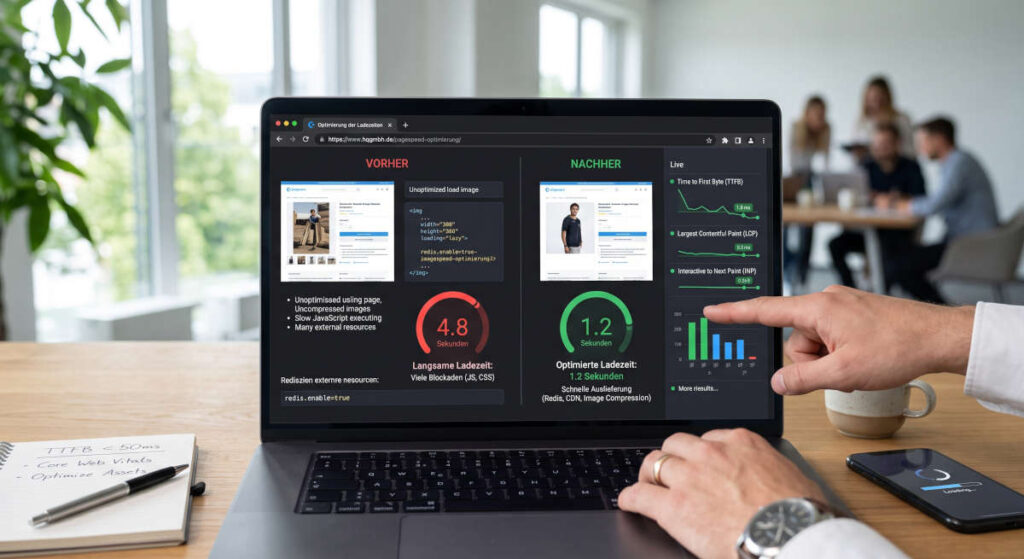
Strategies for improving loading times
Effective optimization of your Shopware 6 shop's loading times requires an in-depth analysis of resource usage. Flawless Shopware cache optimization measurably reduces the load on the database and prevents unnecessary processing during recurring page requests.
We begin with a thorough system analysis to identify the causes of slow loading times. Our expertise as a Shopware agency allows us to develop concrete solutions, which we then implement in collaboration with your developers and hosting providers. This may involve directly optimizing your existing infrastructure or, if necessary, migrating to your own systems optimized for Shopware 6. The goal is to noticeably improve performance, reduce response times, and thus sustainably enhance customer satisfaction and conversion rates, particularly through optimized caching. This ensures that your Shopware 6 store delivers optimal performance at all times.
Use of caching strategies
Caching strategies are essential for drastically reducing the loading times of your Shopware 6 shop under standard operation. By using intelligent mechanisms like Redis for the backend or Varnish as a reverse proxy for the frontend, the number of database queries and the server load for anonymous page requests are significantly reduced. Static content and standard catalog pages are thus loaded from in-memory storage to the customer in milliseconds.
The Damocles' sword of e-commerce: A high-performance Varnish cache should never be misused as a band-aid for deep-seated technical debt. At the latest when a visitor adds a product to their cart, logs into their customer account, or accesses customer-specific pricing, full-page caching is no longer effective. From this point on, every interaction passes unfiltered down to the core architecture and the database. If the code is poorly structured or blocked by inefficient plugins, performance will plummet precisely where it needs to be most stable: in the business-critical checkout process.
Tools for analyzing loading times
For a precise analysis of your Shopware 6 store's loading times, we rely on a combination of proven tools and methods. This includes a detailed examination of loading times and the effective use of caches, as well as the analysis of server logs, database queries, and server metrics. Additionally, we use Google PageSpeed Insights to identify weaknesses directly based on Google's official UX metrics. As part of our technical analysis and consulting, we conduct a detailed Core Web Vitals optimization to sustainably secure your search engine rankings and mobile conversion rate. This comprehensive approach allows us to identify the true bottlenecks and implement targeted optimization measures.
Detailed instructions for measuring and correcting errors can be found in our Core Web Vitals PageSpeed Optimization Guide.
Shopware performance optimization techniques
Make optimal use of the Shopware cache
Efficient caching is a cornerstone of Shopware performance optimization, significantly improving loading times. By correctly configuring caching strategies, especially with tools like Redis for the backend and Varnish for the frontend, static content can be delivered quickly and dynamic content managed efficiently. This considerably reduces server load and accelerates the response times of your Shopware store, leading to significantly better performance and higher customer satisfaction. Detailed customization of this configuration is crucial for optimal performance.
MySQL optimization for better performance
Optimizing your MySQL database is essential for boosting the performance of your Shopware 6 store. A slow database can lead to significant delays in loading times, even if other components are well-configured. Our expertise includes analyzing database queries and precisely adjusting the MySQL configuration to minimize query times and maximize efficiency. These measures improve overall system performance, resulting in faster loading times and a smoother user experience. A properly optimized database is the key to stable and fast performance.
Page speed optimization in Shopware 6
Page speed optimization in Shopware 6 is crucial for an excellent user experience and improved SEO rankings. Targeted measures such as reducing JavaScript and CSS files, compressing images in WebP or AVIF format, and minimizing the Time to First Byte (TTFB) can drastically reduce loading times. Google PageSpeed Insights is a valuable tool for identifying weaknesses and providing concrete optimization recommendations. Comprehensive page speed optimization significantly contributes to increased conversion rates and overall customer satisfaction.
Continuous performance optimization
Role of cron jobs in optimization
Cron jobs play a crucial role in the continuous performance optimization of your Shopware 6 store by automating recurring tasks. These include clearing the cache, updating search indexes, and cleaning up log files. Correct configuration and regular monitoring of these cron jobs ensure that your store runs efficiently and resources are used optimally. The Admin Worker, in particular, is a key component that manages important processes in the background. Precise adjustment of execution intervals and priorities helps to avoid peak loads and stabilize overall performance.
Monitoring Core Web Vitals
Monitoring Core Web Vitals is a crucial component of sustainable performance optimization for your Shopware 6 shop. These Google metrics—including Largest Contentful Paint (LCP), Interaction to Next Paint (INP), and Cumulative Layout Shift (CLS)—provide precise insights into the actual user experience regarding loading speed, interactivity, and visual stability. By using tools like Google PageSpeed Insights, we obtain detailed field data and can take targeted measures to continuously improve performance. Proactive monitoring helps identify potential bottlenecks early and secure top rankings in search engine indexes in the long term.
Noticeable results through continuous optimization
Continuous performance optimization of your Shopware 6 shop leads to noticeable and measurable results. Faster loading times and improved customer satisfaction result in a significant increase in conversion rates and thus revenue. Customers benefit from smooth and fast checkout times, which increases their willingness to buy. Furthermore, server savings can be achieved through more efficient resource utilization and optimal configuration. These long-term advantages underscore the need to understand performance as an ongoing process to ensure sustainable success in e-commerce.
Technical infrastructure for Shopware 6
Technical infrastructure for Shopware 6: The foundation of scalable Shopware systems
Frontend code optimization and fine-tuning of core web vitals are ineffective if the underlying server architecture stagnates during sudden spikes in load. For e-commerce managers with a clear B2B/enterprise focus, hosting infrastructure is not a passive IT expense. It is a direct, measurable lever for conversion rates and transactional stability during checkout. Those who run complex omnichannel platforms or computationally intensive B2B catalogs on inadequately dimensioned standard environments risk timeouts (HTTP 504 gateway errors) and significant revenue losses at the business-critical moment of order placement.
Architectural best practices for high-performance stacks:
- Decoupled application and database layers: The PHP-FPM worker nodes run in isolation from the MySQL or MariaDB instances. This prevents computationally intensive DAL (Data Abstraction Layer) operations from blocking the database's I/O capacity.
- Elasticsearch/OpenSearch separation: Indexing complex product catalogs, custom fields, and customer-specific prices requires massive RAM and CPU resources. Therefore, a fault-tolerant cluster must run the search engine on dedicated server instances.
- Dual in-memory caching via Redis: File-based session handling inevitably leads to file locks and blocked processes under high load. Enterprise infrastructures utilize two physically separate Redis instances: one exclusively for stateless session handling across all nodes, and the second as a high-performance application and HTTP cache.
- Enterprise storage with NVMe RAID infrastructure: When performing parallel ERP interface synchronization and simultaneous checkouts in the shopping cart, the crucial factor is not the sequential read speed, but the number of random read and write operations per second (random IOPS). Only dedicated NVMe drives guarantee low database latency with high queue depth.
Scalability and future-proof protection
While mid-range systems achieve excellent loading times on a dedicated, high-performance managed server, global platforms require modern containerization using Docker and orchestration via Kubernetes (K8s). A Horizontal Pod Autoscaler (HPA) allows the system to autonomously respond to traffic surges, adding new Shopware pods every minute, while upstream load balancers distribute the traffic evenly.
📋 Minimum technical requirements (Shopware 6.8)
Minimum memory_limit = 512M ( 1G recommended for intensive use of PHP 8.4+ JIT compilation and complex product streams).
A minimum of 32 GB to 64 GB of RAM is required for a single-server setup. In a multi-node cluster, at least 16 GB of RAM per stateless PHP application node is required.
At least 8 dedicated (v)CPU cores with high single-core clock speeds for fast, synchronous processing of Symfony requests.
The variable innodb_buffer_pool_size must be set to 60% to 75% of the available RAM to keep the entire SQL database in fast memory.
Exclusive use of enterprise NVMe drives in a RAID configuration with at least 3,000 random write IOPS at a queue depth of ≥ 32.
Separation into at least two independent Redis instances (Instance 1 for persistent session storage; Instance 2 for app and HTTP caches via zstd compression).
Deactivate the standard admin worker in the Shopware backend. Set up server-based CLI workers via systemd or supervisor to reduce the load on HTTP processes.
Supplemented by proactive monitoring (Prometheus, Grafana, checkmk), physically separate data backups outside the primary data center (offsite and immutable backups), and strict SSH and CIS hardening, a high-availability environment is created. This protects your platform from outages and ensures the long-term ROI of your e-commerce project.
Further technical configuration data, specific my.cnf blueprints for PHP 8.4/8.5 and detailed case studies can be found in our technical deep dive on Shopware hosting optimization.
Frequently asked questions about Shopware performance optimization
Optimize Shopware performance – from HTTP caching to high-availability hosting
Implementing these complex strategies is a core part of our daily work. As a certified Shopware agency, we ensure that all technical and infrastructural elements mesh perfectly to extract maximum speed and scalability from your e-commerce platform.
Ready for a digital edge? Choose the right entry point below for a professional system audit by our enterprise experts:
What has the greatest impact on the performance of a Shopware 6 shop?
The biggest performance factors usually lie not in the frontend code, but in the technical infrastructure. Crucial factors include the hosting architecture, HTTP caching, database performance, Redis handling, PHP-FPM configuration, and the quality of the plugins used. Especially in high-traffic shops, bottlenecks often arise from slow database queries, insufficient caching, or non-scalable hosting environments. More on technical infrastructure: Optimize Shopware Hosting Performance (https://www.hqgmbh.de/e-commerce-tipps/shopware-hosting-optimierung/) More on loading times and rendering: Optimize Core Web Vitals (https://www.hqgmbh.de/e-commerce-tipps/core-web-vitals-optimierung/)
Why is standard hosting often insufficient for Shopware?
Shopware 6 is based on Symfony and generates complex database and caching processes. Shared hosting quickly reaches its physical limits here. Insufficient resources, slow storage systems, and missing technologies like Redis, Varnish, or OpenSearch lead to long loading times and unstable checkouts. Professional Shopware projects therefore require dedicated or scalable hosting architectures with optimized infrastructure. Technical Deep Dive: Optimizing Shopware Hosting Performance
How are TTFB, Core Web Vitals, and conversion rate related?
Server response time, also known as Time to First Byte or TTFB, directly impacts metrics like Largest Contentful Paint and thus the Core Web Vitals. Slow server responses delay page loading, worsen the user experience, and increase bounce rates. Especially in e-commerce, even a delay of just a few hundred milliseconds demonstrably leads to lower conversion rates and reduced revenue. More on server response time: Optimize TTFB (https://www.hqgmbh.de/e-commerce-tipps/shopware-ttfb-optimieren/) More on Google PageSpeed and User Experience: Optimize Core Web Vitals (https://www.hqgmbh.de/e-commerce-tipps/core-web-vitals-optimierung/)
When do Redis and Varnish become necessary for Shopware?
For larger product catalogs, high traffic, or complex rule builder configurations, Redis and Varnish are practically essential.
Redis reduces database access through a fast in-memory cache and optimized session handling.
Varnish, or rather modern HTTP caching architectures, significantly reduce the load on PHP and the database by delivering entire pages directly from the cache.
Technical Deep Dive:
Optimize Shopware HTTP Cache
What infrastructure does a scalable Shopware shop require?
A high-performing Shopware shop is typically based on NGINX, PHP-FPM, Redis, Varnish, OpenSearch, or Elasticsearch, as well as an optimized MySQL or MariaDB environment. Additionally, NVMe storage, CDN connections, monitoring systems, and, under high load, Kubernetes or cluster architectures with automatic scaling and high availability are used. More about the infrastructure: Optimizing Shopware Hosting Performance
Why do many Shopware shops become slow despite good hardware?
Even high-performance servers cannot compensate for poor architecture. Common causes include inefficient plugins, a missing HTTP cache, incorrect PHP-FPM configurations, slow database queries, or inadequate caching strategies. A lack of CDN integration and poorly optimized media files also significantly slow down many online stores. More on caching strategies: Optimize Shopware HTTP Cache (https://www.hqgmbh.de/e-commerce-tipps/shopware-cache-optimierung/) More on server latency: Optimize Shopware TTFB (https://www.hqgmbh.de/e-commerce-tipps/shopware-ttfb-optimieren/)
What role does hosting play in the Core Web Vitals?
Hosting directly impacts Core Web Vitals. Slow database access, high server latency, or unstable PHP processes significantly worsen metrics like LCP, INP, and CLS. Modern hosting architectures with Redis, HTTP caching, CDN, and high-performance infrastructure, on the other hand, ensure stable loading times and better Google signals. Technical Deep Dive: Optimizing Core Web Vitals (https://www.hqgmbh.de/e-commerce-tipps/core-web-vitals-optimierung/) More on Infrastructure: Optimizing Shopware Hosting Performance (https://www.hqgmbh.de/e-commerce-tipps/shopware-hosting-optimierung/)
When does Kubernetes become useful for Shopware?
Kubernetes is particularly worthwhile for enterprise projects with high peak loads, international markets, or complex deployment processes. Through autoscaling, rolling deployments, and self-healing, highly available Shopware clusters can be built that remain stable even during Black Friday peak loads and can be updated without downtime. Learn more about scalable hosting architectures: Optimize Shopware Hosting Performance
Mathias Goldhan
Mathias Goldhan laid the foundation for today’s digital agency in 1994 and has been leading HQ GmbH strategically and operationally since 2005. With more than three decades of experience in software development and systems architecture, he advises medium-sized businesses and brands on the digitalization of business-critical processes. He is the strategic mind behind HQ GmbH’s positioning among the Top 100 owner-managed digital agencies (iBusiness/BVDW).
As a recognized SaaS pioneer and specialist in high-performance hosting, he designs highly available cluster infrastructures and leads the technical rescue of stalled large-scale e-commerce projects. He contributes his expertise in resilient systems and API-based B2B automation internationally between the company’s headquarters in Thuringia and its branch in Spain.