Optimize Shopware Core Web Vitals

Long loading times and poor Core Web Vitals cost B2B shops valuable visibility and measurable revenue every day. If your Shopware 6 system collapses under peak loads or interactive elements respond slowly, customers abandon checkout. We show you how to bring LCP, INP and CLS sustainably into the green range — not through superficial plugins, but through in-depth software and server optimization.
This guide is part of our Shopware performance series, which you can find here under Shopware 6 Performance Optimization .
In this article, we show which technical factors influence Core Web Vitals in Shopware and how LCP, INP, CLS and TTFB can be optimized sustainably.
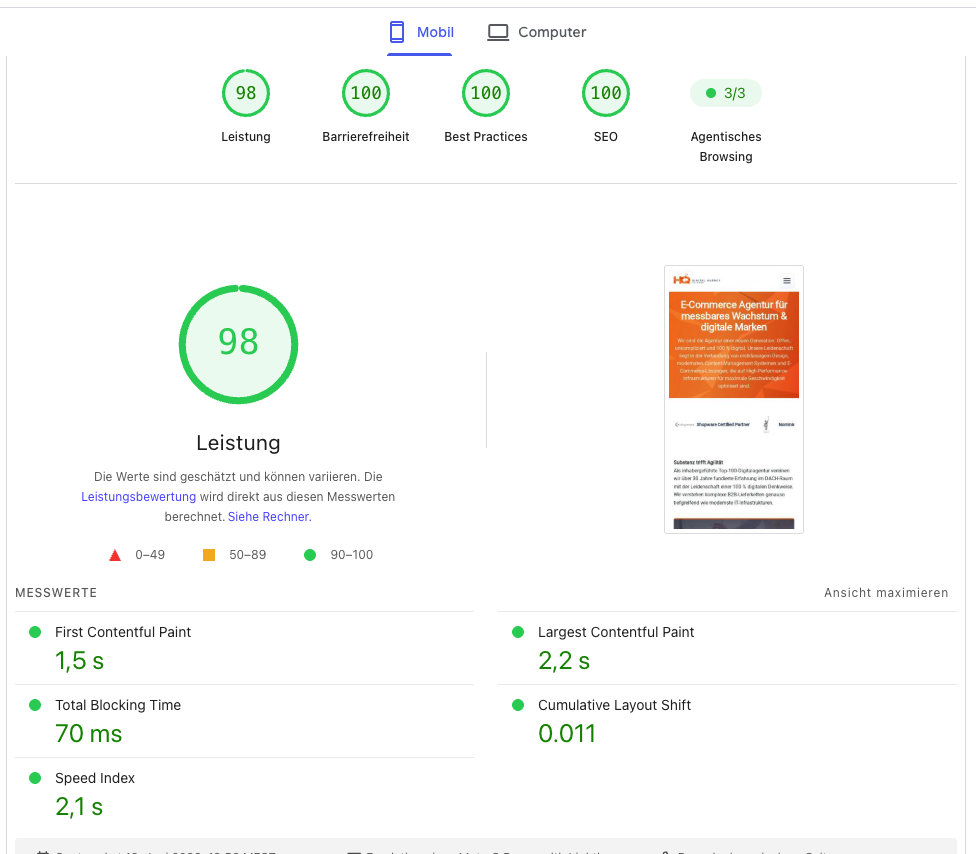
What Are Core Web Vitals?
Definition and Importance
Core Web Vitals are a set of specific metrics that Google uses to evaluate the user experience on websites. They include Largest Contentful Paint (LCP), Cumulative Layout Shift (CLS) and Interaction to Next Paint (INP), with the latter having replaced First Input Delay (FID). These measurable indicators are crucial for PageSpeed optimization and provide insight into a page’s loading time, interactivity and visual stability, which directly affect the user’s perception.
Impact on User Experience
Core Web Vitals have a direct and significant impact on user experience (UX). A high LCP value, which measures the time until the largest element in the visible area has loaded, can lead to frustration, while a high CLS value, which quantifies unexpected layout shifts, makes interaction more difficult. Optimized loading speed and visual stability not only improve the perception of the website, but also reduce bounce rates and encourage positive interaction, especially on mobile devices.
Relevance for E-Commerce
For Shopware operators, the relevance of Core Web Vitals in e-commerce is immense. Poor performance can directly lead to revenue losses, because potential customers leave the shop when loading times are long or usability is poor. Fast loading times and an excellent user experience are crucial not only for customer satisfaction but also for competitiveness. Improving these metrics is therefore a priority for every Shopware shop operator in order to increase conversion rates and strengthen customer loyalty.
Why Are Core Web Vitals Important for Shopware?
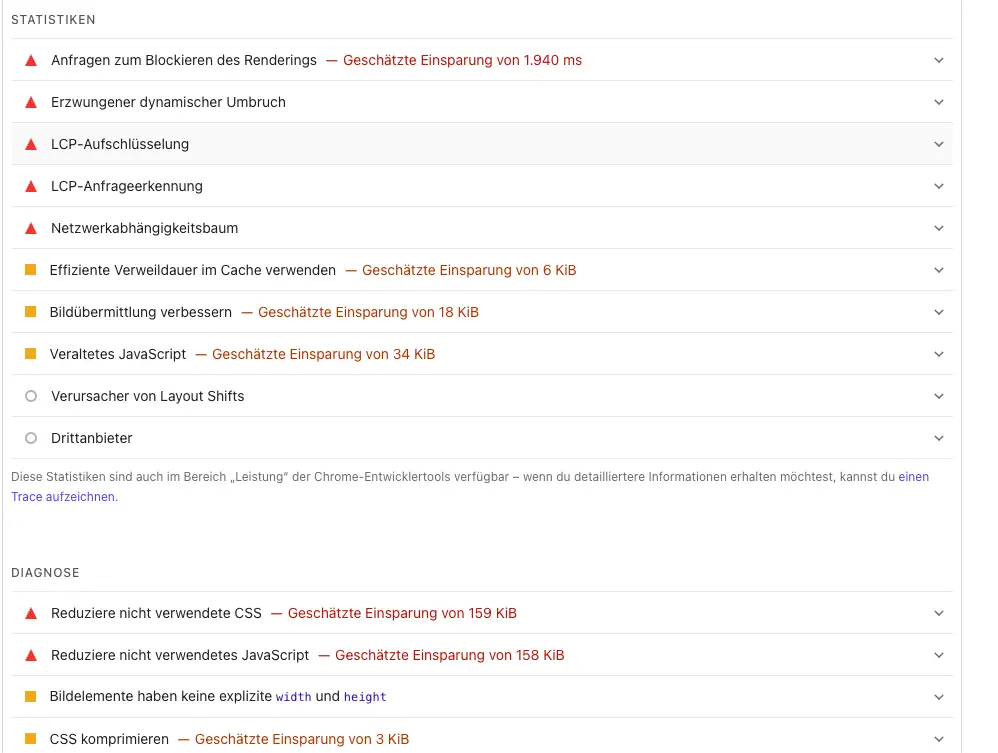
Core Web Vitals are among the most important technical SEO factors for modern e-commerce shops.
Google uses them to evaluate:
- Loading speed
- Interactivity
- Visual stability
Poor values often lead to:
- Worse rankings
- Higher bounce rates
- Lower conversion rates
- Dissatisfied users
Analyzing Core Web Vitals
Largest Contentful Paint (LCP)
Largest Contentful Paint (LCP) is one of the central Core Web Vitals metrics and measures the time required to load the largest visible content element on a page. In Shopware 6 shops, this is often a large hero image, product image or banner. A high LCP value indicates poor loading time and can significantly impair user experience, which in turn can negatively affect Google rankings. Targeted optimization of these elements is therefore essential in order to improve PageSpeed.
Most common blockers in Shopware:
- Unoptimized hero banners,
- missing or incorrectly configured lazy loading,
- DOM structures that are too large in Shopping Experiences.
Interaction to Next Paint (INP)
Interaction to Next Paint (INP) is an important Core Web Vitals metric that measures a page’s responsiveness to user interactions. It replaces First Input Delay (FID) and evaluates the time from a user’s interaction until the next visual update. In Shopware 6 shops, long JavaScript execution times or complex plugin scripts can negatively affect the INP value. Optimizing JavaScript files and reviewing plugin performance are crucial here in order to improve user experience.
Most common blockers in Shopware:
- Complex plugin scripts,
- extremely long JavaScript execution times and synchronous loading processes from third parties that block the main thread.
Cumulative Layout Shift (CLS)
Cumulative Layout Shift (CLS) measures the visual stability of a website by quantifying unexpected layout shifts, that occur during loading. In Shopware 6 shops, these are often dynamically loaded elements such as pop-ups, banners or images without fixed dimensions that shift into the visible area after the initial load. A high CLS value leads to a poor user experience and can be evaluated negatively as a ranking factor. Defining explicit dimensions for all media content is therefore very important for PageSpeed optimization.
Most common causes in Shopware:
- Dynamically loaded cookie layers,
- pop-ups as well as images and promotional banners that lack fixed size attributes (width/height) in the HTML.
Time to First Byte (TTFB)
Time to First Byte (TTFB) is not a direct Core Web Vital, but it is a fundamental metric that measures server response time. An excellent LCP value is hardly achievable in the frontend if the server responds too slowly. Before optimizing scripts, you must first optimize Shopware TTFBin order to minimize the infrastructure’s fundamental response time.
Most common bottlenecks in Shopware:
- Inefficient database queries,
- too many active plugins
- missing in-memory caching (such as Redis or Varnish),
- a server architecture that is not sized for complex Shopware catalogs.
Technical Causes of Performance Problems

Impact of Themes on Loading Speed
Themes play a crucial role in the loading speed of a Shopware 6 shop. Complex, feature-rich themes with a lot of JavaScript and CSS can significantly increase loading times. Every additional function or design element that is not implemented efficiently has a negative impact on Core Web Vitals. It is advisable to choose a lean, optimized theme or develop a custom theme specifically designed for performance in order to improve PageSpeed and rankings.
The Role of Plugins and Their Optimization
Plugins are a common cause of poor performance in Shopware 6. Every plugin, especially third-party plugins, can load additional JavaScript and CSS code that increases loading times and negatively affects Core Web Vitals. Careful selection and regular review of installed plugins are essential. Disable plugins that are not needed and check whether better-performing alternatives are available. Code optimization and loading scripts only where they are actually needed can significantly improve PageSpeed.
Impact of Third-Party Scripts
Third-party scripts such as analytics tools, marketing pixels or chat widgets can significantly affect the loading time of a Shopware 6 shop. These scripts are often loaded synchronously and block page rendering, which increases LCP and impairs interactivity. Strategic implementation, for example through asynchronous loading or moving scripts to the footer, is crucial. Critically evaluate which third-party scripts are truly necessary in order to positively influence PageSpeed and Core Web Vitals.
Optimization Strategies for Shopware
Manually reducing unused scripts requires in-depth knowledge of the Shopware architecture. As a specialized Shopware agency our developers specifically disable unused storefront plugins via theme configuration and custom update-safe extensions — without modifying the core — in order to permanently resolve critical main-thread blockages.
Are your loading times stagnating despite a server upgrade?
As a specialized Shopware agency we do not treat symptoms — we eliminate the causes.
Identify Performance Bottlenecks for Free Now →JavaScript Optimization
JavaScript optimization is a fundamental part of Shopware performance optimization in order to improve Core Web Vitals. Too many or unoptimized JavaScript files can significantly increase loading time and negatively affect LCP and INP. Techniques such as minifying and compressing JavaScript files, deferring or asynchronously loading scripts, and eliminating unused code are crucial, in order to accelerate the PageSpeed of a Shopware 6 shop and optimize user experience. In addition to pure frontend compression, intelligent server-side caching provides the necessary relief for the database on recurring requests. Error-free Shopware cache optimization ensures that HTML documents are delivered at lightning speed — the fundamental basis for drastically reducing Largest Contentful Paint (LCP).
Image Optimization with WebP/AVIF
Image optimization is one of the most effective levers for improving loading time and LCP in Shopware 6 shops. By converting image files to modern formats such as WebP or AVIF, file sizes can be drastically reduced without visible loss of quality. Implementing automatic image conversion directly in Shopware, possibly through plugins or server-based solutions, is essential. This improves not only PageSpeed, but also visual stability and therefore Core Web Vitals, especially on mobile devices.
Implementing Lazy Loading
Lazy loading is a proven technique for improving PageSpeed and Core Web Vitals, especially LCP. By implementing lazy loading, images and other media content are loaded only when they enter the user’s visible area. This significantly reduces initial loading time and relieves the browser because not all resources have to be processed immediately. For Shopware 6 shops, it is advisable to enable lazy loading for all non-critical images and iFrames in order to optimize loading times.
Font Optimization and Critical CSS
Font optimization and implementing Critical CSS are advanced techniques for improving PageSpeed and LCP in Shopware 6. By preloading critical fonts and minimizing the number of font variants loaded, render blocking can be reduced. Critical CSS ensures that only the CSS code required for the initial visible area is loaded, accelerating page rendering. This is crucial for improving user experience and optimizing Core Web Vitals.
Server Performance and Hosting Impact

Optimizing the Server Configuration
Server configuration is a critical factor for overall Shopware performance and directly affects TTFB and loading times. Insufficient server performance or a standard configuration that is completely unsuitable for Shopware (especially with mass-market hosting) can lead to poor PageSpeed even with optimal frontend optimization. Shopware hosting optimization includes correctly sizing the hardware, configuring the web server (e.g. Nginx or Apache), using PHP 8 or higher, and fine-tuning the database. High-performance and reliable hosting is the foundation for excellent Core Web Vitals.
Using Redis and Varnish
Using caching solutions such as Redis and Varnish is essential for Shopware 6 shops in order to minimize server response times and improve TTFB. Redis primarily serves in Shopware as a central store for sessions and the application/HTTP cache, while Varnish acts as a reverse proxy that caches complete HTML page responses and serves them directly for recurring requests without restarting the PHP stack. These caching mechanisms reduce server load and significantly accelerate content delivery. This leads to a drastic improvement in PageSpeed and Core Web Vitals.
Advantages of a Content Delivery Network (CDN)
A Content Delivery Network (CDN) is an excellent solution for accelerating loading times in Shopware 6 shops, especially for globally operating companies. A CDN stores static content such as images, CSS and JavaScript files on servers around the world and delivers them from the geographically closest location to the user. This significantly reduces latency and improves PageSpeed. Using a CDN relieves the origin server and contributes significantly to optimizing Core Web Vitals.
Tools for Analysis and Improvement
Using Google PageSpeed Insights
Google PageSpeed Insights is an indispensable tool for analyzing Core Web Vitals and overall Shopware performance. It provides detailed reports on loading times, LCP, CLS and INP on mobile and desktop devices. The results include both field data and lab data and provide concrete optimization recommendations. Shopware operators should use this tool regularly to identify weaknesses and take targeted measures to improve PageSpeed and rankings.
Optimization with Lighthouse
Lighthouse, an open-source tool from Google, is integrated directly into the Chrome browser and provides a comprehensive analysis of website performance, accessibility, SEO and best practices. For Shopware 6 shops, Lighthouse is a powerful tool for identifying bottlenecks and improving Core Web Vitals. It provides detailed metrics and suggestions for optimizing JavaScript, CSS, images and other elements in order to shorten loading times and sustainably improve user experience.
Typical Errors and Causes of Slow Shops
Common Problems in Shopware 6
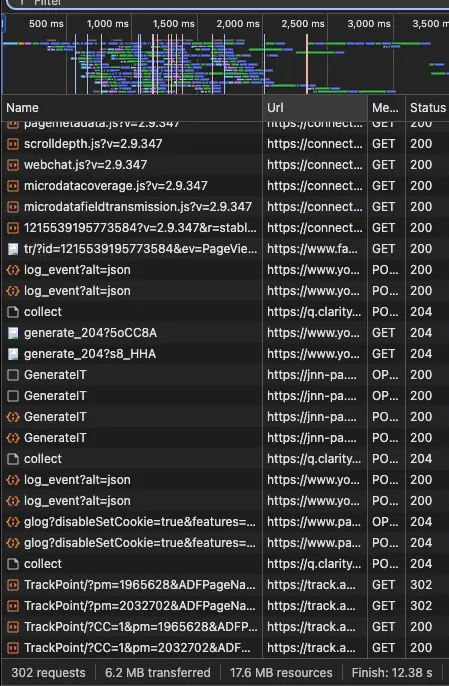
Typical problems that lead to poor Shopware Core Web Vitals and long loading times in Shopware 6 often stem from the complexity of modern e-commerce platforms. These include an excessive number of plugins that often bring unoptimized JavaScript and CSS code with them and massively impair PageSpeed. Unoptimized themes, large image files without suitable formats such as WebP, and insufficient server configurations are also common causes that negatively affect LCP, CLS and INP.
The following areas particularly often cause poor Core Web Vitals:
- Shopping Experiences with too many dynamic elements
- Poorly optimized manufacturer plugins
- Tracking scripts in the theme
- Large sliders above the fold
- Uncached filter and listing pages
- Unoptimized media folders
- Slow Elasticsearch queries
- Blocking cookie-consent tools
Causes of Poor Loading Times
The causes of poor loading times in Shopware 6 shops are varied and technically deep-rooted. Often, unoptimized JavaScript bundles that block rendering are a decisive factor. Images without lazy loading and formats not converted to WebP or AVIF also contribute significantly to increasing LCP. Other problems include inefficient database queries, missing caching (Redis/Varnish), suboptimal hosting and synchronous integration of third-party scripts that impair user experience and rankings.
Because Core Web Vitals can change dynamically with every new plugin, continuous monitoring of field data is advisable. As part of our strategic analysis and consulting we uncover hidden performance drops before they negatively affect your visibility.
Measures to Improve Core Web Vitals
Practical Tips for Shopware Shop Operators
To improve Core Web Vitals, Shopware shop operators should first perform a comprehensive PageSpeed analysis with tools such as Google PageSpeed Insights and Google Lighthouse. Practical tips include consistently optimizing images by converting them to WebP/AVIF and implementing lazy loading. It is also crucial to disable unnecessary plugins and minify and compress JavaScript code in order to shorten loading times and ensure a better user experience. It is also important to check whether the HTTP cache is enabled (development mode disabled?) — this is one of the first points that should be checked.
Long-Term Strategies for Increasing Performance
Long-term strategies for increasing performance in Shopware 6 require continuous optimization and technical adjustment. This includes regularly reviewing and updating the theme and all plugins, in order to ensure compatibility and efficiency. Upgrading to PHP 8.4/8.5, implementing advanced caching mechanisms such as Redis and Varnish, and using a CDN are essential. In addition, consistent monitoring of Core Web Vitals via Google Search Console and continuous optimization of the server configuration are crucial for sustainably improving rankings.
FAQ on Shopware Core Web Vitals
A tip from us in advance. Tackle performance problems at the root — that is the basis for lasting Shopware success and maximum conversion rates. Only by consistently eliminating weaknesses “under the hood” can you create the foundation for a sustainably fast web shop, measurably better rankings and higher conversion rates.
Optimize Largest Contentful Paint
LCP is often worsened by:
- large images
- slow servers
- blocking JavaScript
- missing caching.
- Provide all images in the correct size and as WebP/AVIF.
- Enable and correctly configure lazy loading.
- For pages with high traffic or before campaigns such as Black Friday: clean integration of Varnish or a CDN with edge caching.
- Optimize Critical CSS
- Be sure to use hosting optimized for Shopware. Standard servers usually do not meet the specific requirements of an e-commerce system such as Shopware 6 because these servers have to “fit all customers” and therefore are not configured specifically for Shopware.
Improve Interaction to Next Paint
A poor INP is often caused by:
- An excessive number of plugins or poorly optimized code. Although plugins are reviewed before release in the Shopware Store, performance aspects play hardly any role. Our many years of experience show that even widely used extensions can cause massive speed losses. That is why we now analyze plugin performance for our customers as standard immediately after the server check.
- many / large JavaScript files
- many tracking scripts
- blocking processes
- Overloaded templates: ready-made themes often look impressive, but for marketing reasons — due to countless integrated features — they bring an enormous load of scripts and unused code. These drastically slow down the website’s interaction time.
Avoid / Fix CLS Problems
Layout shifts are often caused by:
- images without size attributes
- fonts that load later
- dynamic banners
- cookie layers
This requires professional development and optimized templates.
Infrastructure and Core Web Vitals
Many shops try to improve Core Web Vitals exclusively through frontend optimization.
In practice, however, the real problems often lie in:
Server response times (see also Hosting)
Hosting: Be sure to use hosting optimized for Shopware. Standard servers usually do not meet the specific requirements of an e-commerce system such as Shopware 6 because these servers have to “fit all customers” and therefore are not configured specifically for Shopware.
Database: One of the most common problems we find on customers’ servers is incorrect MySQL/MariaDB configurations.
The advantage of optimization is the immediately noticeable increase in performance. At the same time, it often allows ongoing server-hardware costs to be reduced noticeably.
The challenge for shop operators: Only genuine database specialists can precisely identify and fix deep-rooted errors in MySQL configuration. Through the setup and operation of cluster systems for an ad-serving system with nearly 100,000 requests per second, we have the in-depth expertise needed to resolve even the most complex database bottlenecks.
Correct configuration of PHP-FPM for Shopware’s requirements
Efficient and correct use of cache systems
Mathias Goldhan
Mathias Goldhan laid the foundation for today’s digital agency in 1994 and has been leading HQ GmbH strategically and operationally since 2005. With more than three decades of experience in software development and systems architecture, he advises medium-sized businesses and brands on the digitalization of business-critical processes. He is the strategic mind behind HQ GmbH’s positioning among the Top 100 owner-managed digital agencies (iBusiness/BVDW).
As a recognized SaaS pioneer and specialist in high-performance hosting, he designs highly available cluster infrastructures and leads the technical rescue of stalled large-scale e-commerce projects. He contributes his expertise in resilient systems and API-based B2B automation internationally between the company’s headquarters in Thuringia and its branch in Spain.