HQ Odoo 19 & Shopware 6 Connector
Connect Odoo & Shopware 6 seamlessly. Plug & Play for €49/month.*
No hidden setup fees. No middleware costs. Bidirectional real-time synchronization of items, inventories, orders, invoices, and customer data — with full control over every automation.
Why shops are switching to our connector
Save yourself months of project time and five-figure development costs. Our connector is a native Shopware 6 plugin that was developed 100% by HQ GmbH. Ideal for growing B2B and B2C shops that want to use Odoo as their single point of truth.
* Our offers are exclusively aimed at commercial customers. All prices are net plus statutory value-added tax.
| Status Quo | HQ Odoo Connector |
|---|---|
| Strict API limits for legacy systems | Unlimited API calls & bulk import |
| Expensive price increases & hidden costs | Transparent costs, no setup fee. |
| Asynchronous data → risk of overselling | Real-time inventory reconciliation via webhook |
| €15,000+ for custom development | Ready-made SaaS solution, ready to use immediately. |
| Blackbox error during synchronization | Transparent error log & circuit breaker |
All functional areas in detail
📦 Catalog, Warehouse & B2B (Pull & Push)
Odoo remains the source of truth. The connector keeps Shopware fully up-to-date – without duplicate maintenance.
- Real-time inventory (pull): Aggregated inventory per product (including multi-warehouse support) with instant updates via Odoo webhook for every change.
- Automatic product import (pull): New and modified Odoo products, variants, attributes, and images automatically appear in the shop.
- B2B price lists & cross-selling (pull): Customer-specific Odoo price lists and accessory recommendations are automatically applied in Shopware.
- Category & Sales Channel Structure (Push): Shopware’s category tree is available in Odoo as a real selection list.
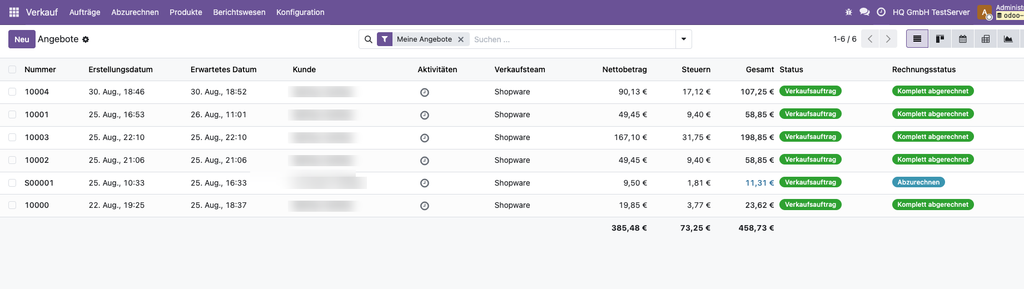
- Orders & B2B Recognition (Push): New orders, including taxes and shipping costs, are recorded in the Odoo journal. B2B customers automatically receive the appropriate price list and an Odoo tag.
💶 Invoicing, Shipping & Taxes
Odoo handles the complete invoicing logic – the connector ensures that Shopware and Odoo always show the same status.
- Payment status reconciliation (bidirectional): Payment and refund statuses remain identical at all times. Credit notes in Shopware automatically generate the corresponding credit note in Odoo.
- Order confirmation (push): Odoo confirms the order and automatically creates the invoice as soon as the order is received.
- Shipping & Tracking (Pull): When Odoo completes the shipment, Shopware marks the order as shipped – including the tracking number.
- Shipping cost sync (pull): If the price of an Odoo shipping method changes, Shopware automatically adopts the new rate.
- Tax & Export Data (Push): HS codes, countries of origin, and EU B2B and third-country tax items are applied correctly across borders.
⚙️ Operational Safety & Assignment Tables
Built to simply work in the background. Managed directly in the Shopware admin – without any developers.
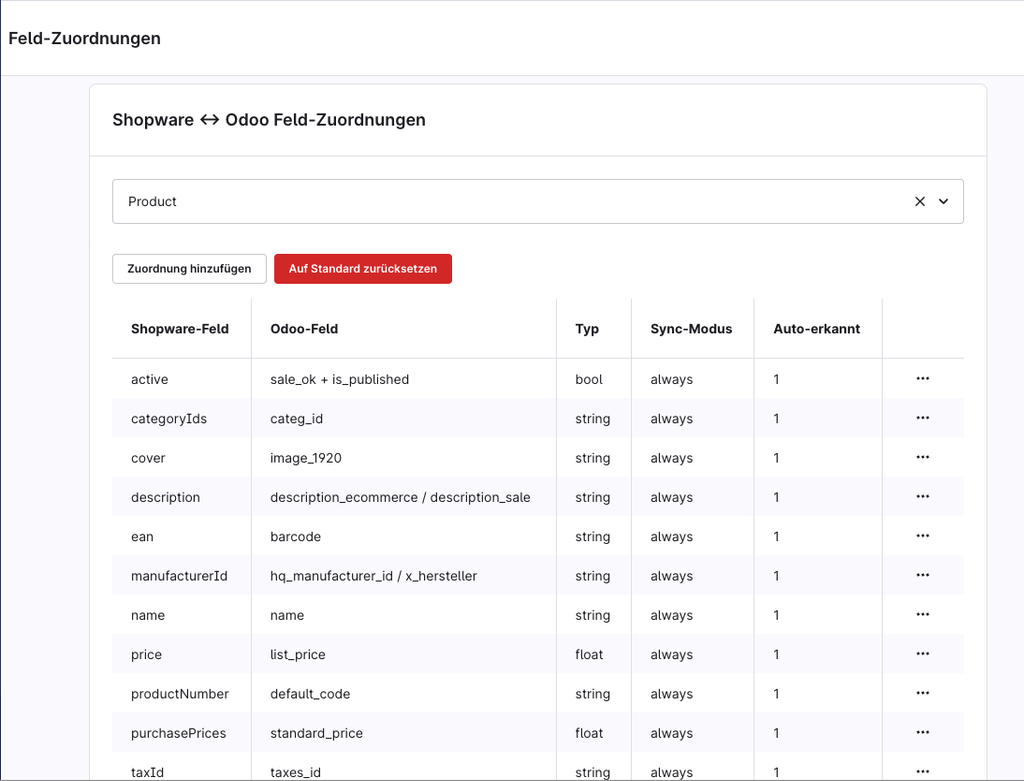
- 6 Assignment tables: Taxes, countries, payment and shipping methods can be assigned transparently and without guesswork. Each country is automatically recognized by its ISO code.
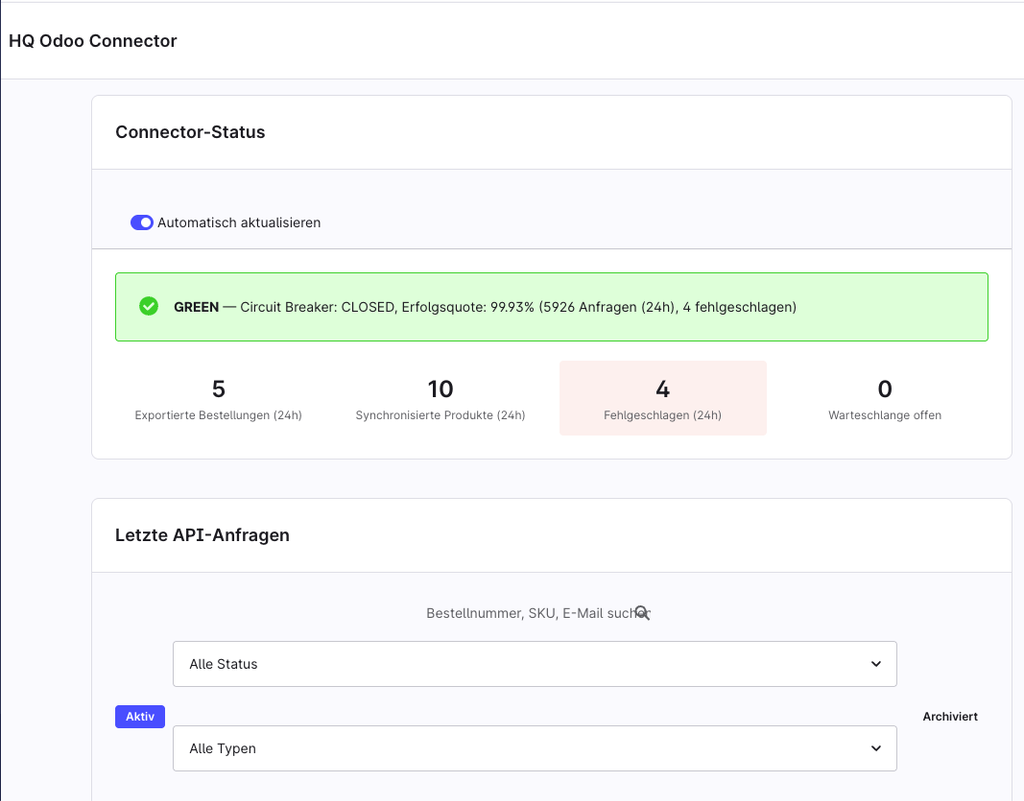
- Circuit Breaker: In the event of persistent connection problems to Odoo, the connector automatically pauses and sends an email warning instead of continuing to try unsuccessfully.
- Self-healing synchronization: Known incidents (e.g., deleted data records) are detected and proactively cleaned up.
- Complete log: Every sync operation is documented in the Shopware admin and can be traced – including error details in plain text.
- High-performance (RabbitMQ): Full support for asynchronous message queues, so that Varnish setups remain lightning-fast even during peak loads.
Agency Services: Setup & Customization
Don’t want to set up the interface yourself? Many companies install the connector themselves but outsource the initial mapping. Our setup service will set up the interface for you, check your B2B data structures, and ensure that everything is synchronized correctly from day one.
Are you looking for a custom integration? Do you want Odoo to be connected not only with Shopware, but also with marketplaces (e.g. Amazon, Kaufland, Shop Apotheke) or other systems? We develop individual Odoo interfaces tailored to your requirements.
Frequently Asked Questions (FAQ)
How do I get my existing Shopware items to Odoo for the launch?
For this purpose, the connector has an integrated one-time bulk import tool. With a single command, your complete existing Shopware catalog (up to approx. 5,000 items/variants) can be automatically transferred to Odoo – including complex data structures such as quantity-dependent tiered prices. This makes the initial integration of Odoo into Shopware safe and stress-free.
How many API calls are possible with the HQ Odoo Connector?
The connector works without artificial API limits. The number of synchronizations is limited exclusively by your Odoo and Shopware server capacity, not by our software.
Does the connector slow down my shop’s loading times?
No. The connector runs completely asynchronously in the background (RabbitMQ Ready) and is compatible with modern caching architectures such as Varnish. Your shop’s loading times remain fast.
Can I map individual B2B data fields that are not part of the standard?
Yes. In addition to all standard fields (and automatic detection via our assignment tables), the connector supports the assignment of individual requirements for complex B2B structures.
**Which versions is the connector compatible with?**
The connector is natively developed for Shopware 6 and optimized for smooth interaction with modern Odoo 19 versions (JSON-2 API is required). The plugin is fully multilingual (DE / EN).